Quick Grade a Test
| Wrong | Correct | Percent | Letter |
|---|
Grade scale reference
| Letter | Range |
|---|---|
| A | 90-100% |
| B | 80-89% |
| C | 70-79% |
| D | 60-69% |
| F | 0-59% |
Keyboard shortcuts: W = add one wrong answer, R = reset for next student.
EZ Grader Online (QuickGrade, EasyGradeCalculator): How It Works
An easy grader, also searched as EZ grader, ezgrader, quickgrade, ezgrade, or easygradecalculator, converts one number into another: how many wrong on a test into a percentage and a letter grade. Teachers have used the physical paper EZ grader wheel since the mid-twentieth century to grade paper tests faster than a phone calculator allows. This online version does the same thing for any test length, updating the result as you type.
Enter the total number of questions and the number the student missed. The easygrader shows the percentage correct and the corresponding letter grade immediately. To grade a full stack of tests at the same length, use the R key or the Reset button to clear the wrong count between papers without re-entering the total.
EZ Grader (EZGrade) Formula: The Easy Grade Calculator Math
- Total Questions = number of items on the test
- Questions Wrong = number the student missed
- Total − Wrong = Questions Correct
Quick Grade Scale: Common Test Lengths and Letter Cutoffs
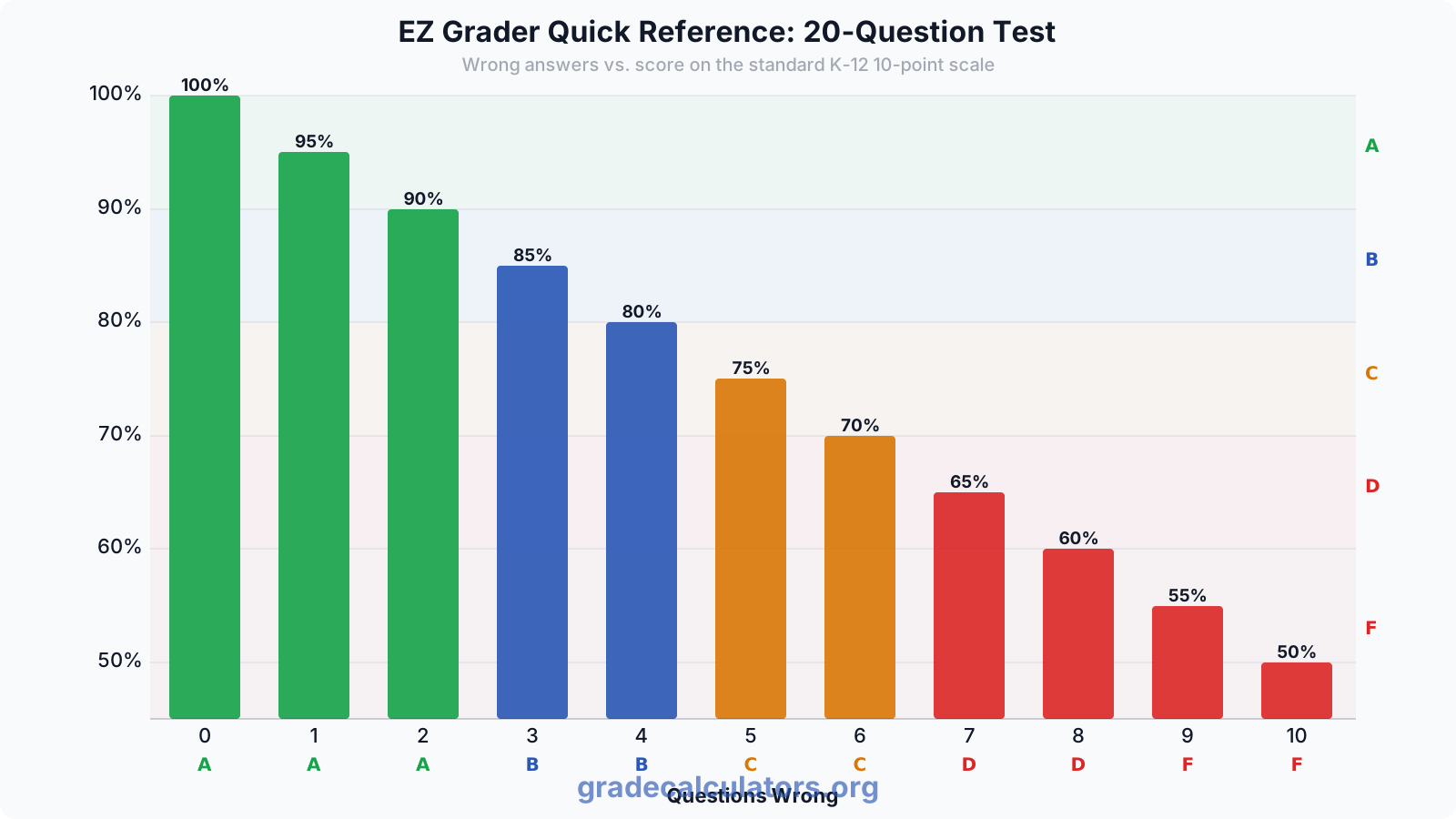
The chart below shows wrong-answer counts from 0 to 10 for a 20-question test alongside each score's percentage and letter grade. Teachers use a reference like this to grade a stack of papers without entering each score individually into a calculator.
10-Question Quick Grade Chart
| Wrong | Percent | Letter |
|---|---|---|
| 0 | 100.00% | A |
| 1 | 90.00% | A |
| 2 | 80.00% | B |
| 3 | 70.00% | C |
| 4 | 60.00% | D |
| 5 | 50.00% | F |
Note: on a 10-question quiz, each wrong answer costs 10 percentage points, one of the steepest cliffs in common classroom use. A quick grader makes this visible before you post grades.
20-Question Quick Grader Scale
| Wrong | Percent | Letter |
|---|---|---|
| 0 | 100.00% | A |
| 1 | 95.00% | A |
| 2 | 90.00% | A |
| 3 | 85.00% | B |
| 4 | 80.00% | B |
| 5 | 75.00% | C |
| 6 | 70.00% | C |
| 7 | 65.00% | D |
| 8 | 60.00% | D |
| 9 | 55.00% | F |
25-Question EZ Grader Chart
| Wrong | Percent | Letter |
|---|---|---|
| 0 | 100.00% | A |
| 1 | 96.00% | A |
| 2 | 92.00% | A |
| 3 | 88.00% | B |
| 4 | 84.00% | B |
| 5 | 80.00% | B |
| 6 | 76.00% | C |
| 7 | 72.00% | C |
| 8 | 68.00% | D |
| 9 | 64.00% | D |
| 10 | 60.00% | D |
| 11 | 56.00% | F |
50-Question Teacher Grader Scale
| Wrong | Percent | Letter |
|---|---|---|
| 0 | 100.00% | A |
| 2 | 96.00% | A |
| 4 | 92.00% | A |
| 6 | 88.00% | B |
| 8 | 84.00% | B |
| 10 | 80.00% | B |
| 12 | 76.00% | C |
| 14 | 72.00% | C |
| 16 | 68.00% | D |
| 18 | 64.00% | D |
| 20 | 60.00% | D |
| 21 | 58.00% | F |
The easy grader above generates the complete scale for any length, including every missing row. The tables here show key cutoffs for the most common classroom test lengths.
Teacher Grading Calculator (PaperGrader) Workflow: A Tool for Grading Papers Fast
The easy grader is built for one specific workflow: a teacher with a stack of paper tests, all the same length, scored right or wrong per question. Enter the test length once. Then for each paper, type the number of questions that student got wrong and read the percentage and letter grade. Move to the next paper, press R (or Reset), and the wrong count clears while the test length stays in place.
For tests you give repeatedly, click "Show full grading scale" to see every possible wrong-answer count for that length. Screenshot the scale table and tape it inside your grade book or print it on a sticker for the stack. Grading 30 papers with a pre-printed scale takes about two minutes once you know the test length.
Watch the letter-grade cliffs on short quizzes. On a 10-question quiz, one wrong answer is 10 percentage points. Two wrong drops a student from 100% (A) to 80% (B) in two questions. On a 100-question test, one wrong answer is 1 percentage point, which rarely crosses a letter boundary. A quick grader makes these cliffs visible before you commit them to the gradebook.
Keyboard Shortcuts for the Easy Grader Online
When the cursor is not inside a text field, two keyboard shortcuts speed up stack grading:
- W: add one wrong answer to the current count. Press W repeatedly to step through the wrong-answer values without touching the input field.
- R: reset for the next student. Clears the wrong count so you can grade the next paper without reaching for the mouse. The test length stays in place.
These shortcuts match the workflow popularized by online grader tools built for rapid stack grading: enter the test total once, then use W to mark each wrong answer on the current paper, read the result, press R, move to the next paper. A stack of 30 tests can be graded in under three minutes using this pattern.
Ezgrader vs Grades Calculator for Teachers: Which Tool Fits Your Task
This ezgrader (also called easy grade calculator, quick grade tool, quickgrade calculator, or teacher grader) handles one workflow well: equal-weight right-or-wrong questions on a single test. For anything more complex, use a purpose-built tool:
- Multiple sections or different point values? Use the test grade calculator, which sums points across sections.
- Multiple assignments, categories, or weights? Use the grade calculator, which supports both points-based and percentage-weighted grading.
- Students asking what they need on the final? Point them to the final grade calculator.
The easy grade calculator here stays simple by design. No account, no install, no paywall. Enter the total, enter the wrong count, read the result. That is the complete workflow the original paper EZ grader offered, and it is still the fastest way to grade a stack of paper tests.
Always verify letter grade cutoffs with your specific school's registrar before posting final grades. Grading scales vary by district and institution. The percentages this calculator produces are mathematically exact; the letter assignments follow the standard K-12 10-point scale and may differ from your school's policy.